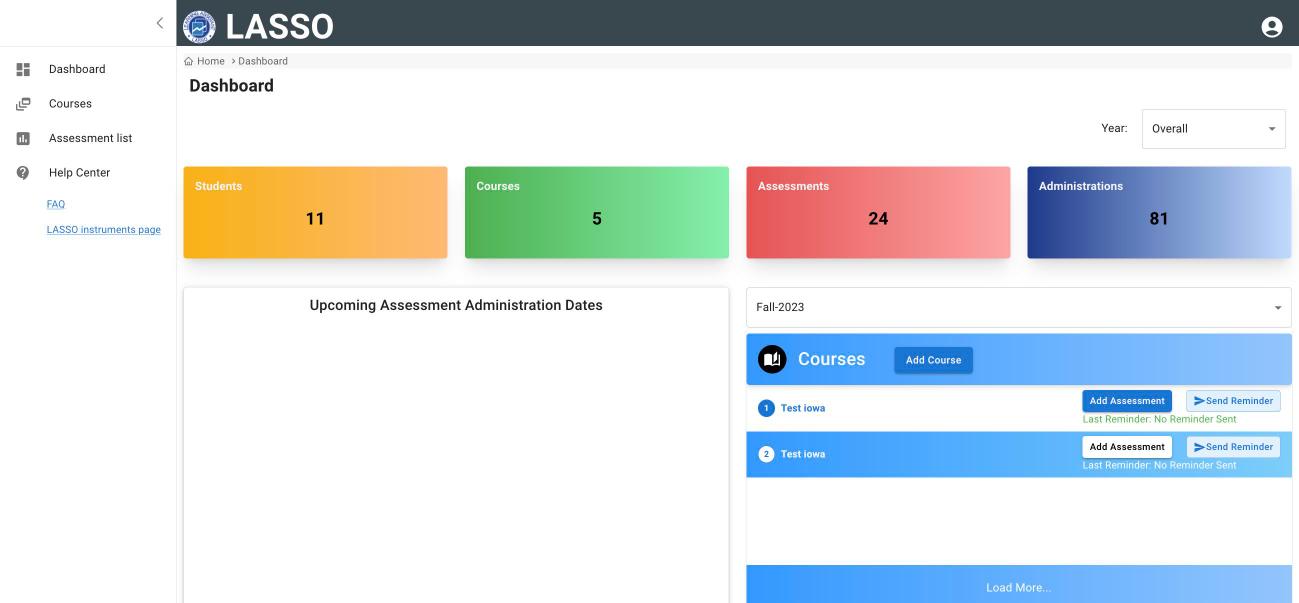
After you sign in, LASSO opens on your Dashboard. The menu on the left takes you to everything else.
The left menu
- Dashboard: a summary of your courses and upcoming administrations.
- Courses: every course you teach or coordinate. This is where most work happens.
- Assessment list: every assessment available in LASSO, with previews.
- Help Center: links to the FAQ and the assessments page.
Tip: If clicking a menu word does not open the page, click its icon instead.
The Dashboard
- Students, Courses, Assessments, Administrations: counts across your courses. Use the Year menu to filter.
- Upcoming Assessment Administration Dates: administrations that are scheduled or open, with start and end times.
- Courses panel: pick a term, then use Add Course, Add Assessment or Send Reminder for a course. Last Reminder shows when students were last emailed.
The Assessment list
Lists every assessment by Discipline, Official Name and Code. Click the eye icon under Preview Version to see what students see. Use Search to find an assessment by name or code. Adaptive assessments do not have a preview.
My Account
Click the person icon at the top right, then My Account.
- PROFILE: your name, preferred first name, and RESET PASSWORD. Click SAVE after changes.
- PREFERENCES: choose which LASSO emails you receive (workshops, updates, research, or none).
- AFFILIATIONS: the institutions linked to your account. If you teach at more than one institution, add each one here; one is your default.
To sign out, click the person icon, then Sign Out.
Next: Create a course
All instructor guides | Help Center home
Verified on LASSO version 10.1.2, October 2026. Questions? Email contact@lassoeducation.org.