
You can add one or more assessments to a course. Each assessment can be given several times (administrations), usually twice: a pre-test and a post-test.
Choose an assessment
Browse the assessments page or the Assessment list in LASSO. There are three kinds, and each has a different report:
- Concept inventories: research-based tests of conceptual understanding, usually given pre and post.
- Likert-scale surveys: attitudes and beliefs (for example CLASS).
- Cognitive diagnostic (adaptive) assessments: adaptive tests that report proficiency and skill mastery and can be given many times (for example the Mechanics Cognitive Diagnostic). These need one extra setup step.
Add an assessment
- Click Courses, then ADD ASSESSMENT on your course’s row. (Or click Add Assessment next to the course on the Dashboard.)
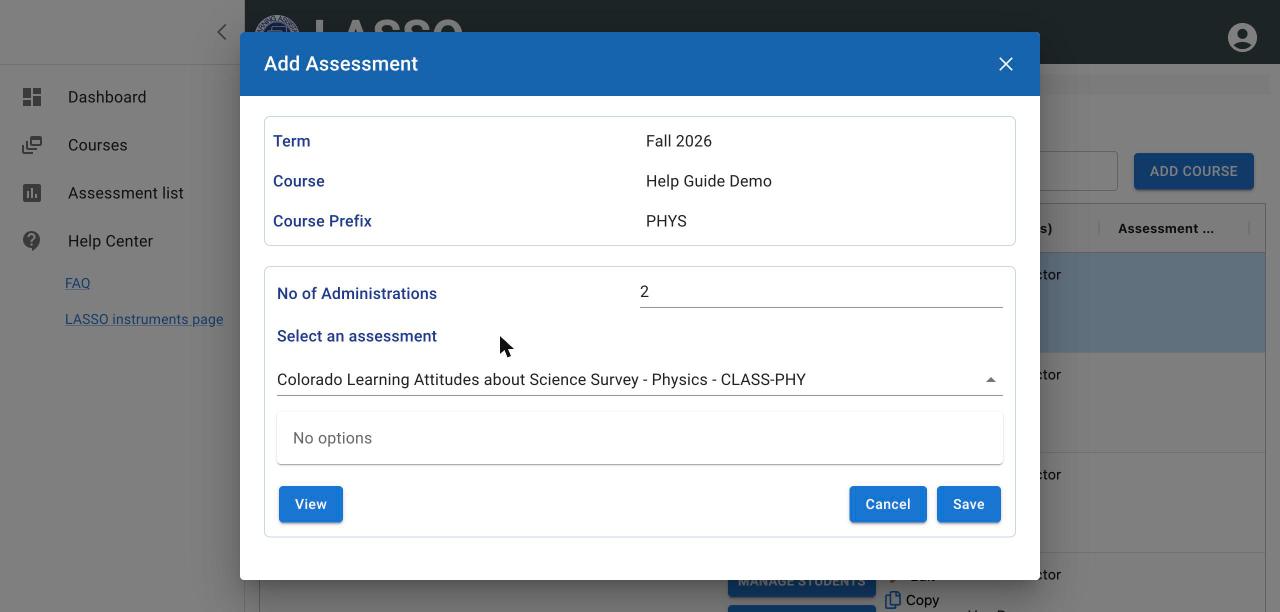
- Check No of Administrations. The default is 2 (pre and post). Change it if you plan to give the assessment more often.
- Under Select an assessment, type part of the name or scroll the list, which is grouped by discipline. Click the assessment.
- Optional: click View to preview it in a new tab, exactly as students see it. Close the tab when done. Adaptive assessments cannot be previewed.
- Click Save, then OK on Assessment added successfully!
Repeat to add more assessments to the same course.
Tip: Students may see a different, more general name than you do. For example, CLASS-PHY appears to students as “Science Attitudes Survey”.
Change the number of administrations or remove an assessment
- To change how many times it is given, open the assessment’s administration page (how to open it), enter the new Number of Administrations and click Set number of administrations.
- To remove it, open the course’s assessment list (scroll the Courses table right and click the arrow next to the course name) and click the red trash icon next to the assessment.
Next: Add and manage students
All instructor guides | Help Center home
Verified on LASSO version 10.1.2, October 2026. Questions? Email contact@lassoeducation.org.