
Check participation a few days into each administration so you have time to remind students.
See who has finished
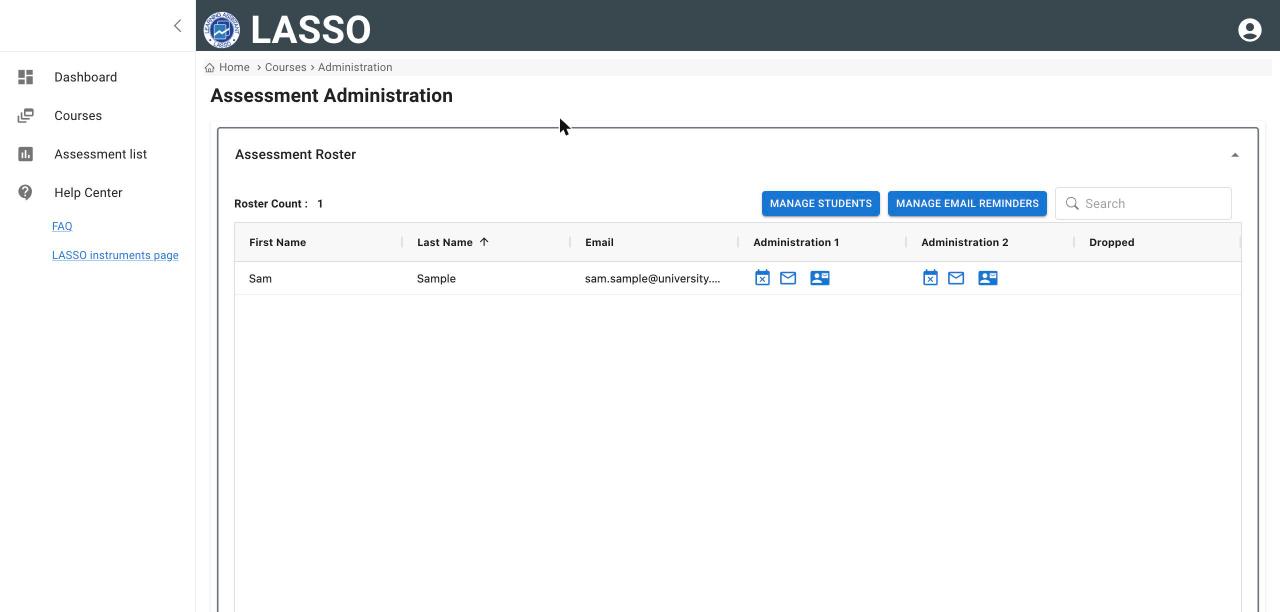
- Open the assessment’s administration page and open Assessment Roster.
- Each administration has a column of icons for every student. The first icon (Participation indicator) shows whether the student has completed it: a green check means completed.
- Use Search to find a student. Roster Count shows how many students are on the roster.
See totals
- Each administration card under Administrations shows Responses (completed out of total).
- The Dashboard lists open and upcoming administrations under Upcoming Assessment Administration Dates.
Students who saved an assessment to finish later still appear as not completed until they submit.
Next: Download your data
All instructor guides | Help Center home
Verified on LASSO version 10.1.2, October 2026. Questions? Email contact@lassoeducation.org.